
How to Start Pinterest for Beginners: Insane Viral Hacks That Actually Work
Figuring out how to start Pinterest for beginners feels overwhelming — I get it. You see influencers bragging about 100K monthly views while you’re staring at a blank account wondering which button to click first. The frustration compounds when every “guide” you read regurgitates the same surface-level advice that stopped working in 2021. Here’s the thing: I’ve spent over a decade in content marketing and SEO, and I can tell you that Pinterest remains one of the most underrated traffic machines on the internet. Most people just use it wrong. This guide gives you the exact playbook I use — the insider strategies, the myth-busting truths, and the advanced tactics that turn a dead Pinterest account into a traffic-generating beast. If you’re serious about building an online presence, start with this foundational guide and then come right back here.
Table of Contents
- What Does It Actually Mean to Start Pinterest as a Beginner?
- Setting Up Your Pinterest Business Account the Right Way
- Understanding Pinterest SEO — Yes, It’s a Search Engine
- Content Strategy: How to Come Up with Content Ideas That Work
- Creating Pins That Get Clicks, Not Just Saves
- Pinterest Content Planning: Your Weekly Workflow
- Advanced Viral Hacks Most Gurus Won’t Tell You
- Frequently Asked Questions
- My Top Recommended Gear
What Does It Actually Mean How to Start Pinterest for Beginners?
Starting Pinterest as a beginner means creating a free business account, optimizing your profile with niche-relevant keywords, setting up 8-12 keyword-rich boards, and consistently publishing original pin designs that link to your blog or website. It functions as a visual search engine, not a social media platform.
Let me bust the biggest myth right now: Pinterest is NOT social media. I repeat this to every client I work with. Pinterest functions as a visual search engine — closer to Google than to Instagram. This distinction changes everything about your content strategy. When you understand that people come to Pinterest with search intent (they’re actively looking for solutions, products, and ideas), you stop treating it like a place to post selfies and start treating it like the traffic goldmine it actually is.
According to Pinterest’s own business resources, the platform reaches over 450 million monthly active users globally, with 85% of weekly Pinners making purchase decisions directly from pins they discover. That’s not vanity engagement — that’s buyer intent. If you’re building a blog or online business, ignoring Pinterest means leaving serious money on the table. Speaking of which, if you haven’t started a monetizable blog yet, this step-by-step guide walks you through the entire process.
Setting Up Your Pinterest Business Account the Right Way
Skip the personal account. Go straight to Pinterest Business and create a proper business account from day one. Here’s why this matters: business accounts unlock Pinterest Analytics, Rich Pins, and advertising tools. You literally cannot run a serious content marketing operation without these features.
Your Setup Checklist (Do This in Order)
- Profile Name: Use your brand name + primary keyword (e.g., “DailyNetBlog | Blogging Tips & Content Ideas”)
- Bio: Write a keyword-rich bio that tells visitors exactly what you help with. Skip the cute quotes. Be specific.
- Profile Photo: Use a clear headshot or brand logo. No blurry phone selfies — first impressions matter, even on Pinterest.
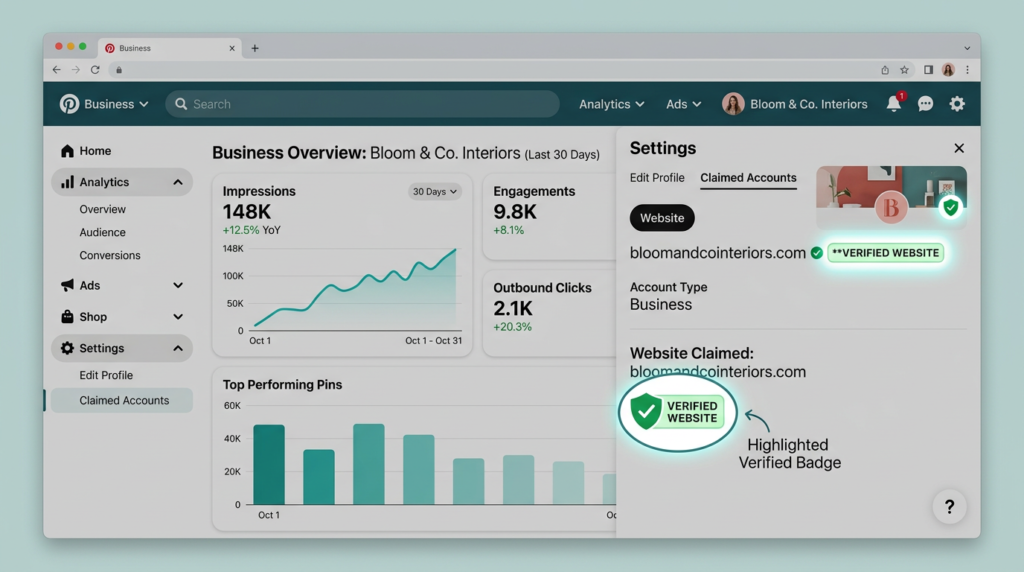
- Claim Your Website: This verifies your domain, gives your pins a clickable link, and boosts your authority in the algorithm.
- Enable Rich Pins: Rich Pins pull metadata from your website (article title, description, author) and display it directly on the pin. This increases click-through rates significantly.
Board Strategy That Actually Moves the Needle
Create 8-12 boards that match the core topics of your niche. Each board needs a keyword-optimized title and a 2-3 sentence description stuffed (naturally) with related search terms. Don’t create a board called “Random Inspo” — create one called “Content Marketing Tips for Bloggers.” See the difference? Pinterest’s algorithm reads board names and descriptions to determine what your content is about.
Understanding Pinterest SEO — Yes, It’s a Search Engine
This is where 90% of beginners completely whiff it. They create gorgeous pins and wonder why nobody sees them. The answer is almost always terrible SEO. Pinterest SEO works similarly to blog SEO — you need to tell the algorithm exactly what your content covers using strategic keywords.
Where to Place Keywords on Pinterest
- Profile name and bio
- Board titles and descriptions
- Pin titles (up to 100 characters — use every single one)
- Pin descriptions (up to 500 characters — front-load your primary keyword)
- Image file names (name your file “content-marketing-tips.png” not “IMG_4829.png”)
- Alt text on your website images that the Rich Pin pulls from
Here’s a pro content marketing tip most people miss: use Pinterest’s own search bar as your keyword research tool. Start typing a topic and watch the auto-suggest dropdown populate with real user queries. These are gold. I keep a running spreadsheet of these suggestions and use them for both my pin descriptions and my blogging ideas. The U.S. Small Business Administration even recommends Pinterest as a viable marketing channel for small businesses — that’s how legitimate this platform has become.
Content Strategy: How to Come Up with Content Ideas That Work
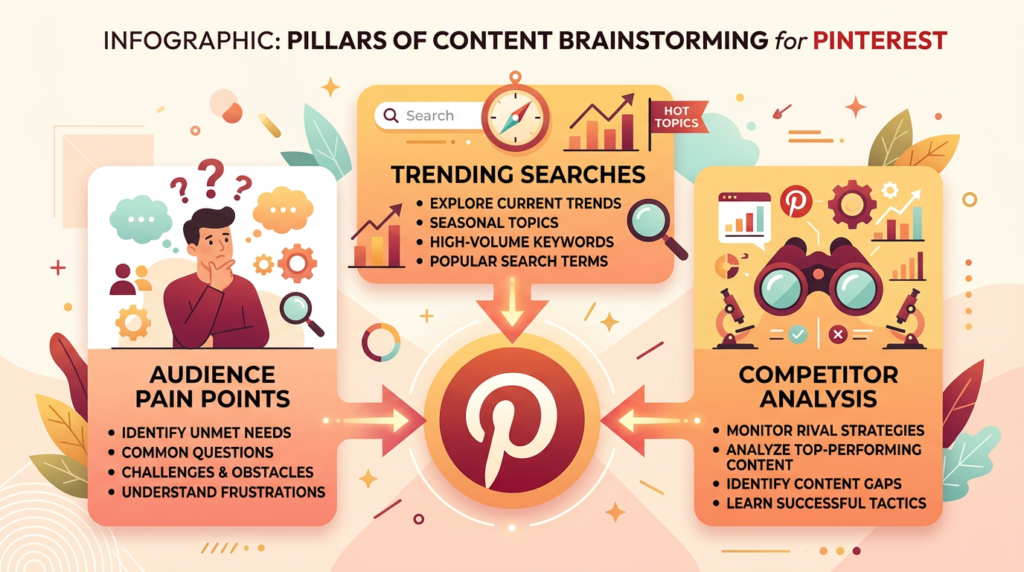
The number one question I hear during content brainstorming sessions is “What do I even pin about?” And honestly, the answer is simpler than you think. Your creative content ideas should come from three sources:
1. Your Audience’s Actual Pain Points
Stop guessing what people want. Go read comments on competitor pins, browse relevant Reddit threads, and check “People Also Ask” boxes on Google. If someone asks it, you can pin it. When you want to know how to come up with content ideas, start with real questions from real humans.
2. Pinterest Trends and Seasonal Spikes
Pinterest publishes a free Pinterest Trends tool that shows you exactly what’s surging in search volume. I plan my content creation calendar around this data 30-45 days ahead of seasonal peaks. Holiday content? Start pinning in September. Summer recipes? Start in March. Early birds dominate on Pinterest.
3. Competitor Reverse-Engineering
Find the top 5 accounts in your niche. Sort their pins by most popular. Study the design patterns, headline formulas, and topics that resonate. I’m not saying copy — I’m saying analyze and improve. This is content brainstorming at its most strategic. If you’re pairing Pinterest with affiliate revenue, definitely read my breakdown on affiliate marketing for bloggers to maximize every click.
Creating Pins That Get Clicks, Not Just Saves
Here’s the hard truth that took me years to learn: a pretty pin means nothing if nobody clicks it. Saves are nice for ego. Clicks drive revenue. Every pin you create needs to answer one question in the viewer’s mind: “What’s in it for me if I click this?”
The Anatomy of a High-Converting Pin
- Vertical format: 1000×1500 pixels (2:3 ratio). Pinterest literally recommends this. Anything else gets cropped or buried.
- Bold, readable text overlay: 6-10 words max. Think blog post headline, not novel excerpt.
- Contrasting colors: Pins with warm tones (reds, oranges) statistically outperform muted palettes. But test for your niche — beauty and wellness audiences respond well to pastels.
- Clear branding: Add your URL or logo subtly. Every viral pin is a billboard for your brand.
- Strong CTA: “Read More,” “Get the Free Guide,” “Try This Today” — tell people what to do next.
🔥 Pro Recommendation: Canva Pro for Pinterest Pin Design
I’ve tested every design tool under the sun, and Canva Pro remains my go-to for Pinterest pin creation. The pre-built Pinterest templates, brand kit feature, and background remover save me hours every week. If you’re serious about scaling your pin output, this is non-negotiable. Grab it here:
Check Out My Recommended Design Tool →
*This is an affiliate link. I only recommend tools I personally use and trust.
Pinterest Content Planning: Your Weekly Workflow
Consistency beats intensity on Pinterest. Every. Single. Time. I use a dead-simple weekly workflow for my content planning that takes about 3 hours per week total. Here’s what it looks like:
- Monday: Keyword research + brainstorm 10-15 pin topics using Pinterest search bar and Trends tool
- Tuesday-Wednesday: Batch-design 15-20 pins in Canva (multiple designs per blog post)
- Thursday: Write optimized pin titles and descriptions for each pin — front-load keywords
- Friday: Schedule everything using Tailwind or Pinterest’s native scheduler for the upcoming week
- Weekend: Engage with 10-15 pins in my niche (repin, comment) to signal activity to the algorithm
This content planning rhythm keeps my account consistently active without burning me out. And honestly? The batch approach to content creation changed my entire workflow — not just on Pinterest but across every platform I manage. IMO, if you’re not batching, you’re wasting time.
Expert Commentary: This video breaks down Pinterest’s algorithm changes and gives a solid walkthrough of setting up boards and pins correctly — worth watching if you’re a visual learner who wants to see the process in action.
Advanced Viral Hacks Most Gurus Won’t Tell You
Alright, this is the section you actually came for. Let me share the content strategy tactics that separate accounts stuck at 1K views from those pulling 500K+ monthly impressions. I’ve tested all of these across multiple niches over the past three years.
Hack #1: The “Fresh Pin” Multiplier
Pinterest’s algorithm heavily favors “fresh pins” — new images linked to any URL (even old blog posts). I create 5-8 different pin designs for every single blog post I publish. Same URL, different visuals and headlines. This multiplies my chances of the algorithm picking up and distributing at least one version. Most beginners make one pin per post and wonder why nothing happens. Don’t be that person 🙂
Hack #2: Idea Pins for Authority, Standard Pins for Traffic
Idea Pins (Pinterest’s short-form, multi-slide format) don’t allow clickable links — so they won’t drive direct traffic. BUT they dramatically boost your account authority and follower count, which makes your standard pins perform better. I use a 70/30 split: 70% standard pins (traffic drivers) and 30% Idea Pins (authority builders).
Hack #3: Ride the “Seasonal Wave” 45 Days Early
I mentioned this earlier, but it deserves its own spotlight because it’s that important. Pinterest content peaks 45 days before the event. If you pin Christmas content on December 20th, you’ve already lost. The top-performing creators start their holiday pinning in early November. Research from Harvard Business Review’s marketing research consistently shows that early-mover advantage matters enormously in content distribution — and Pinterest is no exception.
Hack #4: Turn Every Blog Post into a Pinterest Funnel
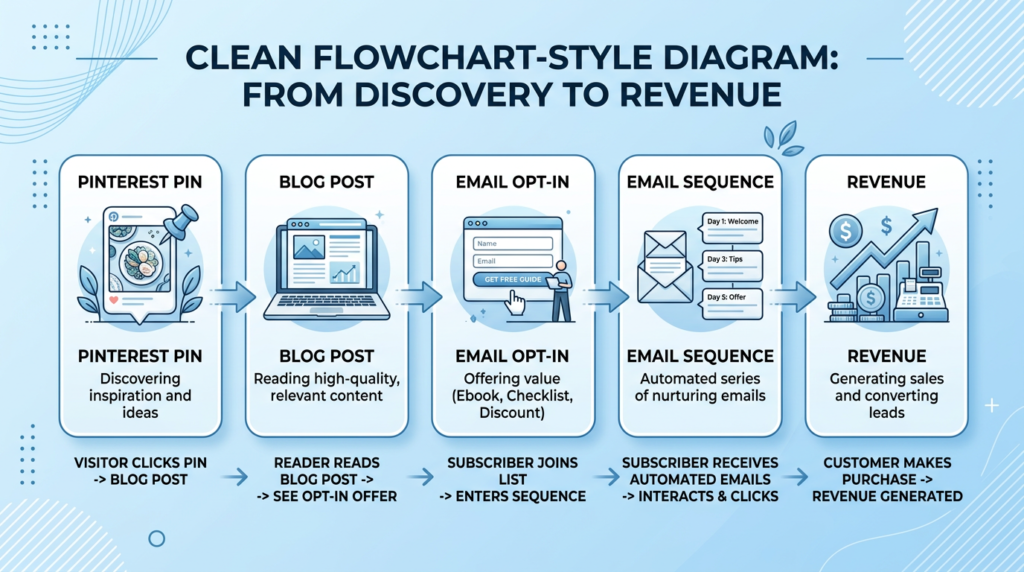
This is pure content strategy gold. For every blog post, I create a matching free downloadable (checklist, template, cheat sheet). The pin links to the blog post, the blog post offers the freebie in exchange for an email, and the email sequence promotes affiliate products or services. One pin can power an entire revenue funnel. Check out my recommended tools page for the exact software stack I use to build these funnels.
Hack #5: Strategic Group Boards Are Still Alive (Barely)
Everyone said group boards died. They didn’t — they just got noisier. The trick is to join ONLY small, active group boards (under 30 contributors) with strict quality rules. These still pass meaningful authority and distribution. Avoid the mega-boards with 500+ contributors — those are spam graveyards. FWIW, I get about 15% of my Pinterest traffic from three well-curated group boards.
Frequently Asked Questions
Is Pinterest still worth it for beginners in 2025?
Absolutely. Pinterest drives over 5 billion searches per month and offers a significantly longer content lifespan than Instagram or TikTok. A single pin can generate traffic for 6-12 months, making it one of the highest-ROI platforms for content creators and bloggers starting fresh.
How many pins should a beginner post per day?
Start with 5-10 fresh pins per day. Consistency matters more than volume. Focus on creating 3-5 original pin designs daily and supplement with a few repins from relevant boards in your niche. Ramp up as your content creation workflow becomes more efficient.
Do I need a blog to succeed on Pinterest?
A blog dramatically amplifies your Pinterest results because each pin links back to content you own. However, you can also drive traffic to YouTube channels, Etsy shops, or affiliate landing pages. That said, I strongly recommend building a blog first — here’s how to start a blog that actually makes money.
How long does it take to see results on Pinterest?
Most beginners see meaningful traction within 3-6 months of consistent pinning. Pinterest rewards patience. Unlike social media posts that die in hours, your pins compound over time as the algorithm indexes and distributes them across related search queries.
My Top Recommended Gear
These are the exact tools sitting on my desk and in my browser tabs right now. I use every single one of these for my Pinterest and content marketing workflow:
- Canva Pro Subscription: My pin design workhorse. Templates, brand kits, and background remover make batch pin creation effortless. Check price on Amazon →
- Logitech C920 HD Webcam: Essential for creating Idea Pin video content and course material. Crystal-clear 1080p quality without breaking the bank. Check price on Amazon →
- Ring Light with Tripod Stand: Game-changer for flat-lay photography and product shots that become high-performing pins. Good lighting = more clicks. Check price on Amazon →
Disclaimer: This post contains affiliate links. As an Amazon Associate and ClickBank Partner, I may earn a commission from qualifying purchases at no additional cost to you.