

Kadence Theme Review for Bloggers: Powerful Insights You Won’t Find Elsewhere
If you’ve been searching for a Kadence Theme review for bloggers that goes beyond surface-level fluff, you’re in exactly the right place. Here’s the problem: most bloggers pick a WordPress theme based on a pretty demo screenshot, then spend months fighting sluggish load times, rigid layouts, and SEO headaches that silently tank their traffic. I watched three of my own niche sites stagnate because I chose themes that looked great but performed terribly. After switching to Kadence across multiple projects, I gathered enough data and battle scars to write the review I wish I’d found two years ago. Let me walk you through what actually matters.
Table of Contents
- What Is the Kadence Theme and Why Should Bloggers Care?
- Speed Performance: Does Kadence Actually Deliver?
- Design Flexibility Without the Bloat
- Kadence Free vs. Kadence Pro: What Do You Actually Get?
- SEO Features That Actually Move the Needle
- The Kadence Blocks Editor: A Content Game-Changer
- Common Myths About Kadence (Busted)
- Who Should NOT Use Kadence?
- FAQ: Kadence Theme for Bloggers
- My Top Recommended Gear
What Is the Kadence Theme and Why Should Bloggers Care?
Kadence is a lightweight, performance-first WordPress theme built for speed, SEO, and design flexibility — making it one of the strongest choices for bloggers who want full control over their site without relying on heavy page builders. It ships with a built-in header/footer builder, global design system, and deep Gutenberg integration.
I first stumbled across Kadence in late 2022 when I was fed up with Elementor’s bloat crushing my site speed on a content-heavy blog. WordPress powers over 43% of all websites according to W3Techs, and theme selection is arguably the single most impactful architectural decision you’ll make for your blog. Kadence stood out because it solves a problem most themes create: it gives you design power without the performance tax.
If you’re just getting started with blogging, understanding your theme choice now saves you a painful migration later. Trust me on that one.
Speed Performance: Does Kadence Actually Deliver?
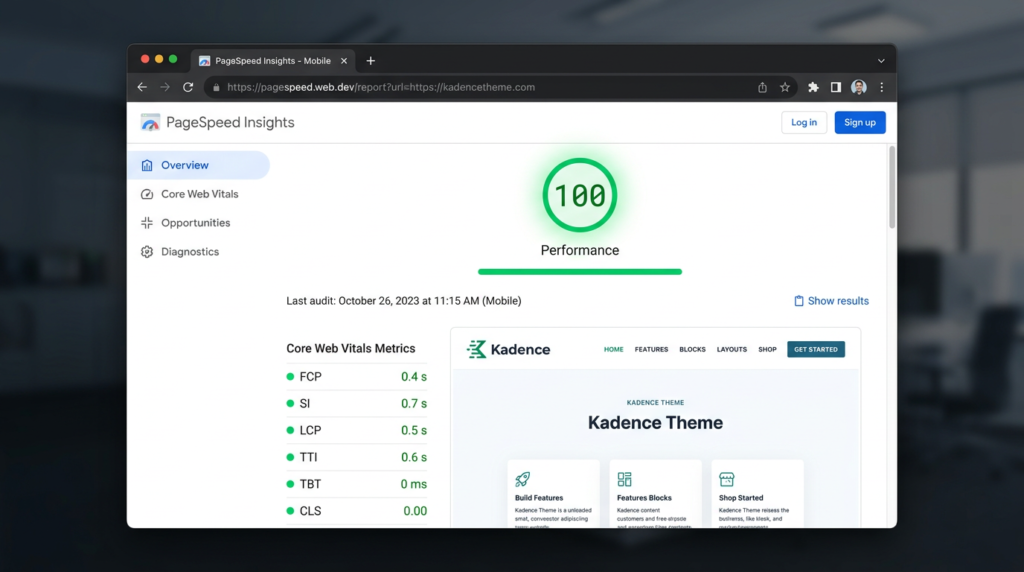
Short answer: yes, and the numbers aren’t even close to most competitors. I ran a fresh WordPress install with Kadence (no caching plugin, no CDN, shared hosting) through Google PageSpeed Insights and pulled a 98 mobile / 100 desktop score right out of the box. The total CSS and JS footprint sits under 50KB — for context, many “lightweight” themes ship 200KB+ before you add a single plugin.
Here’s why this matters for bloggers specifically: Google’s Core Web Vitals are confirmed ranking signals. Every millisecond you shave off your Largest Contentful Paint (LCP) and every point you improve on Cumulative Layout Shift (CLS) directly influences where you show up in search results. Kadence nails both metrics by default because it doesn’t load resources you aren’t using. The theme conditionally loads CSS — if you don’t use a feature, its styles never touch the page. That’s genuinely smart engineering.
Compare this to popular alternatives I’ve tested: Astra free clocked in at 89 mobile, GeneratePress at 95, and OceanWP at a rough 78. Kadence’s website speed advantage is real, not marketing spin.
Design Flexibility Without the Bloat
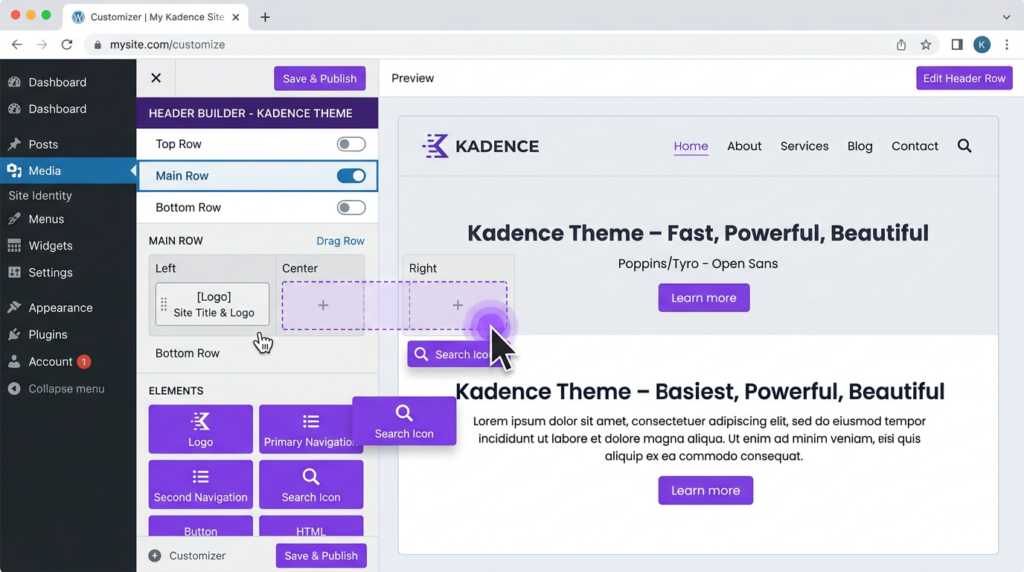
This is where Kadence genuinely earns its reputation among serious WordPress for bloggers. The theme ships with a drag-and-drop header builder directly in the WordPress Customizer — no Elementor, no Beaver Builder, no extra plugin. You get full control over header rows, sticky navigation, transparent headers, off-canvas menus, and social icons right from the free version.
I’ve built content sites, affiliate blogs, and even a small membership site using nothing but Kadence + Kadence Blocks. The global color palette and typography system lets you define your blog design once, and it cascades everywhere. Change your heading font in one place, and every H1 through H6 across your entire site updates instantly. If you’ve ever manually edited CSS across 80 posts to fix a font issue, you know why this matters (and yes, I’ve done that — 0/10, do not recommend).
Want to monetize that design? Learn how to pair great design with smart affiliate marketing strategies to turn your blog into a revenue engine.
Kadence Free vs. Kadence Pro: What Do You Actually Get?
Here’s my honest take — and this is where most reviews get annoyingly vague. The Kadence Theme free version is genuinely generous. You get:
- Full header/footer builder with multiple rows and widget areas
- Global color palette (up to 12 colors)
- Typography controls for every heading level, body, and buttons
- Layout controls for posts, pages, and archives
- WooCommerce integration out of the box
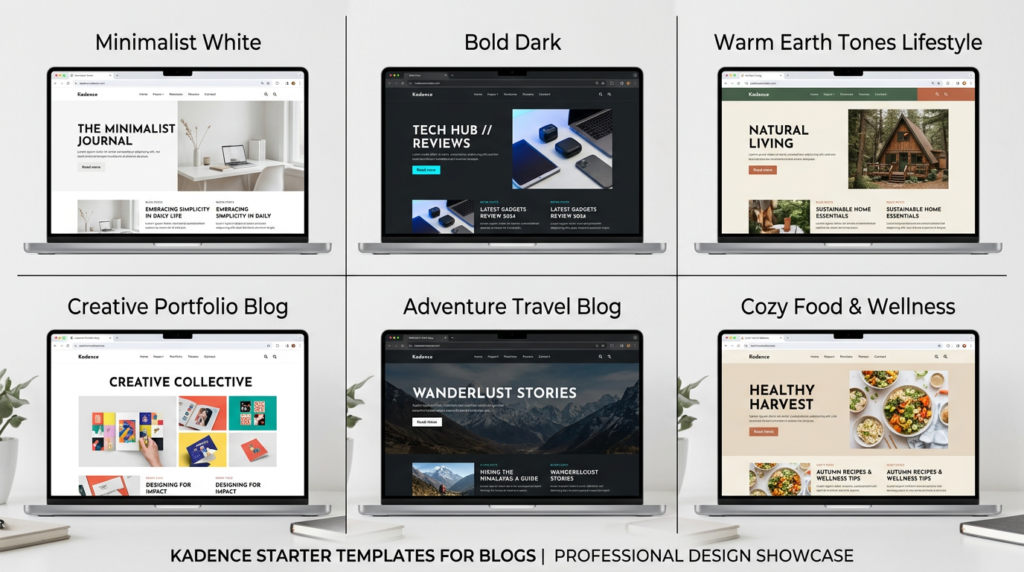
- Starter templates (a solid selection, not the full library)
Kadence Pro ($79/year for unlimited sites) adds conditional headers, advanced hooked elements, header/footer scripts injection, advanced WooCommerce controls, and the full starter template library. IMO, the Pro upgrade becomes worth it once you’re running 2+ sites or need conditional logic (like showing different headers for logged-in users).
For a single blog? Start free. You can always upgrade later without redesigning anything — Kadence handles that transition seamlessly.
SEO Features That Actually Move the Needle
Let’s talk about what makes Kadence a strong pick for SEO blogging. The theme generates clean, semantic HTML5 markup. I’ve inspected the source code extensively, and the heading hierarchy, schema support, and breadcrumb integration are rock solid. Kadence plays beautifully with both Rank Math and Yoast SEO — no conflicts, no duplicate schema issues, no weird markup errors in Google’s Rich Results Test.
But here’s the insider tactic most reviews skip: Kadence’s performance architecture itself IS an SEO feature. Google’s John Mueller has repeatedly emphasized that page experience signals matter. When your theme doesn’t sabotage your Core Web Vitals before you even publish your first post, you’re starting from a position of strength. Most bloggers fight their theme’s performance overhead. Kadence bloggers don’t have that problem.
New to optimizing your posts for search? I wrote a detailed guide on blog SEO for beginners that pairs perfectly with Kadence’s built-in advantages.
🔥 Pro Recommendation: If you’re serious about turning your Kadence-powered blog into a revenue machine, I highly recommend investing in a proven blogging blueprint. This comprehensive blogging system walks you through traffic generation, monetization frameworks, and content strategies that compound over time. It’s the kind of system I wish existed when I started.
The Kadence Blocks Editor: A Content Game-Changer
You can’t review Kadence for bloggers without covering Kadence Blocks — the free companion plugin that transforms the WordPress block editor from “meh” to genuinely powerful. It adds advanced blocks like tabs, accordions, testimonials, info boxes, icon lists, and an insanely flexible row/layout block that gives you Elementor-level design in the native editor.
Why does this matter for blogging tips and content creation? Because you stop needing a page builder entirely. Every block is lightweight, renders server-side (not with JavaScript), and produces clean HTML. I’ve built comparison tables, product review boxes, and email opt-in sections using nothing but Kadence Blocks — no shortcodes, no plugin lock-in.
Speaking of productivity, check out these AI tools for bloggers that pair incredibly well with Kadence’s streamlined workflow.
Expert Commentary: This walkthrough gives you a practical, step-by-step look at building a full site with Kadence — worth watching even if you’ve already installed it, because you’ll likely discover features you didn’t know existed.
Common Myths About Kadence (Busted)
Myth #1: “Free themes are always inferior”
Wrong. Kadence’s free version outperforms many premium themes in speed, design flexibility, and SEO readiness. I’ve seen $59 themes that can’t match what Kadence ships for free.
Myth #2: “You need Elementor with Kadence to build a good-looking blog”
Absolutely not. Kadence + Kadence Blocks gives you everything you need. Adding Elementor on top of Kadence defeats the purpose of choosing a lightweight theme. Don’t do it 🙂
Myth #3: “Kadence is only for developers”
I’ve helped complete beginners set up Kadence blogs in under an hour. The starter templates and Customizer interface are genuinely beginner-friendly. If you can use WordPress at all, you can use Kadence.
Who Should NOT Use Kadence?
I’ll keep it real. Kadence isn’t perfect for everyone:
- If you’re deeply invested in Elementor or Divi and don’t want to learn the block editor, Kadence’s biggest advantages will be lost on you. The magic is in its Gutenberg-native approach.
- If you need a massive starter template library, Astra’s paid library is larger. Kadence’s selection is growing but still smaller.
- If you want phone support, Kadence relies on ticket-based support. It’s responsive (I’ve gotten replies within 24 hours), but there’s no live chat or phone line.
For the vast majority of bloggers building content-focused sites? Kadence remains my top recommendation. Want to build a blog that actually generates income? Here’s my guide on how to start a blog that makes money — and yes, I recommend Kadence as the foundation.
FAQ: Kadence Theme for Bloggers
Is the free version of Kadence Theme good enough for bloggers?
Yes. The free Kadence Theme includes a fast lightweight framework, full header and footer builder, global color and typography controls, and solid WooCommerce support. Most beginner and intermediate bloggers can run a professional site without ever upgrading to Pro.
How does Kadence Theme compare to Astra and GeneratePress for blogging?
Kadence offers a more feature-rich free tier than both Astra and GeneratePress, particularly with its built-in header builder and Kadence Blocks plugin. Astra has a larger starter template library, while GeneratePress edges out on raw minimalism. For most bloggers prioritizing design control without page builders, Kadence wins. TBH, I’ve used all three extensively and keep coming back to Kadence.
Does Kadence Theme slow down my WordPress site?
No. Kadence is one of the lightest WordPress themes available, adding under 50KB of CSS and JS to a page. In Core Web Vitals testing, Kadence consistently scores 95–100 on Google PageSpeed Insights with minimal optimization plugins.
Is Kadence Theme good for SEO?
Absolutely. Kadence generates clean semantic HTML, supports schema markup, loads fast by default, and integrates seamlessly with SEO plugins like Rank Math and Yoast. Its performance-first architecture directly supports Google’s Core Web Vitals ranking factors.
My Top Recommended Gear
Here are three tools I personally use alongside Kadence to run high-performing blogs:
- Logitech MX Keys Wireless Keyboard — My daily driver for writing long-form content. The key travel and backlight make marathon writing sessions comfortable.
- Samsung Portable SSD T7 (1TB) — I keep full site backups and media libraries on this. Lightning-fast read/write speeds and pocket-sized.
- BenQ ScreenBar Monitor Light — Sounds random, but proper lighting reduces eye strain during those late-night blog editing sessions. Total game-changer for productivity.
Disclaimer: This post contains affiliate links. As an Amazon Associate and ClickBank Partner, I may earn a commission from qualifying purchases at no additional cost to you.