

Powerful Content Ideas From Customer Questions
Finding content ideas from customer questions sounds almost too simple. Maybe that’s why most creators skip it. They chase trending topics, spy on competitors, or stare at a blank screen hoping for inspiration — while ignoring the goldmine sitting in their own inbox.
Here’s the frustrating part. You already have the questions. They’re buried in support emails, DMs, comment threads, and sales calls. Every single one represents a real person struggling with a real problem. And every one of those problems is a blog post waiting to happen.
I’ve spent over a decade building SEO content strategies. The single most reliable source of high-ranking blog post ideas? Customer questions. Not keyword tools. Not competitor analysis. Real questions from real people. Let me show you exactly how I use them.
Table of Contents
- Why Customer Questions Are a Content Gold Mine
- Where to Find Customer Questions (7 Sources)
- How to Turn Questions Into Blog Post Ideas
- The SEO Content Strategy Behind This Approach
- My Simple Framework for Prioritizing Questions
- Real Examples That Prove This Works
- Common Mistakes to Avoid
- Frequently Asked Questions
- My Top Recommended Gear
Why Customer Questions Are a Content Gold Mine
Customer questions make excellent content ideas because they reflect real search intent, use natural language that matches Google queries, and address genuine pain points — which means your content ranks faster, earns more trust, and converts better than topic ideas pulled from thin air.
You already believe something important: your audience matters more than algorithms. If you create content for real humans, rankings follow. Customer questions are the purest expression of that belief.
Think about it. When someone emails you asking “How do I fix X?” — that’s not a hypothetical topic. That’s a confirmed need. Someone cared enough to write you about it.
Now multiply that by hundreds. According to research from the Consumer Financial Protection Bureau, the questions consumers ask companies reveal systemic knowledge gaps across entire industries. One question from one customer usually represents dozens — or thousands — of people silently Googling the same thing.
This is why audience research through customer questions beats generic keyword research. Keywords tell you what people search. Questions tell you why they search and what they actually need.
If you’ve been struggling to come up with content ideas, you’re probably overthinking it. Stop brainstorming. Start listening.
Where to Find Customer Questions (7 Sources)
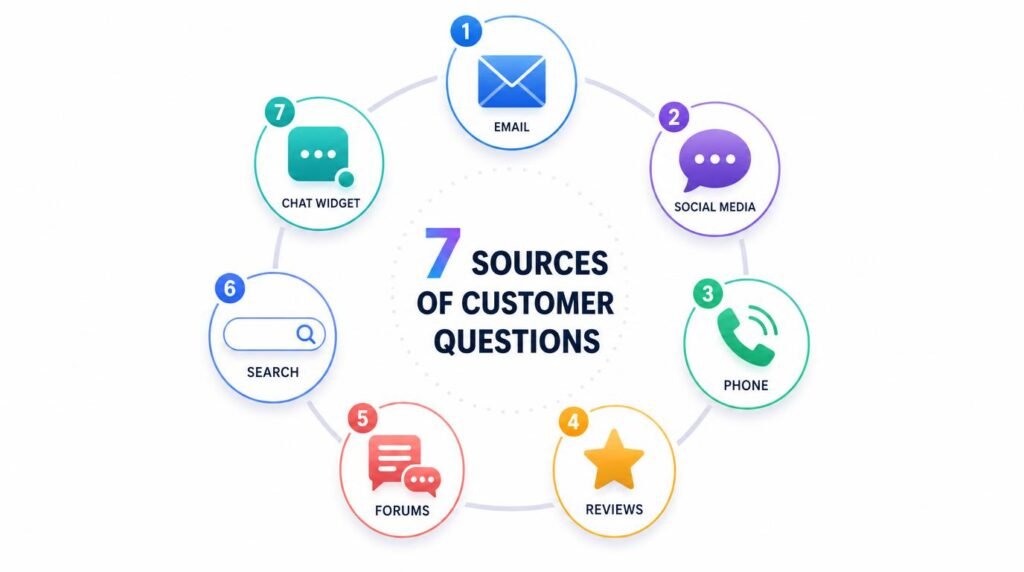
I collect questions from seven specific places. Some are obvious. A few will surprise you.
1. Your Email Inbox
Search your inbox for question marks. Seriously. Open Gmail, type “?” in the search bar, and filter by messages from customers. You’ll find dozens of content ideas in minutes.
I did this last month and found 23 unique questions I’d never addressed on my blog. Each one became a potential article.
2. Support Tickets and Live Chat Logs
If you use any help desk tool — Zendesk, Intercom, Freshdesk — export your tickets. Sort them by frequency. The questions people ask most often deserve dedicated blog posts.
3. Social Media Comments and DMs
Instagram DMs, Twitter replies, Facebook comments. People ask questions wherever they find you. Screenshot them. Log them in a spreadsheet. These are customer insights in their rawest form.
4. Sales Call Notes
Your sales team hears objections and questions every day. Ask them to share the top 10 questions prospects ask before buying. Each objection is a blog post that removes friction from your funnel.
5. Google’s “People Also Ask” Boxes
Type your main topic into Google. Click every “People Also Ask” result. More questions appear. Keep clicking. I’ve pulled 40+ questions from a single search this way. Google’s own documentation confirms these reflect common user queries.
6. Reddit and Quora
Find subreddits related to your niche. Sort by “Top” posts. Half of them are questions. Quora is literally built on questions. Both platforms hand you blog post ideas on a silver platter.
7. Amazon and G2 Reviews
Read one-star and three-star reviews of products in your space. Customers complain using the exact language they’d type into Google. Those complaints are questions in disguise.
If you’re a solo creator, building a system to capture these questions should be part of your content creation workflow. I keep a simple Google Sheet with columns for the question, the source, and the potential search volume. That sheet never runs dry.
How to Turn Questions Into Blog Post Ideas
Collecting questions is step one. Turning them into strategic content is where the magic happens.
I use a three-step process. It takes about 15 minutes per question.
Step 1: Group Similar Questions Together
Customers ask the same thing in different ways. “How do I start a blog?” and “What’s the first step to blogging?” are the same question. Group them. The variations become your secondary keywords and subheadings.
Step 2: Identify the Format
Not every question needs a 2,000-word guide. Some need a quick answer (FAQ section). Others need a step-by-step tutorial. A few deserve a full pillar post.
Here’s my rule of thumb:
- Simple factual question → FAQ entry or short post (500 words)
- “How do I…” question → Step-by-step tutorial (1,000–1,500 words)
- Complex strategy question → In-depth guide (2,000+ words)
- Comparison question → Versus-style post with a table
Step 3: Add Your Unique Angle
Answering the question isn’t enough. Anyone can answer a question. Your job is to answer it better — with personal experience, original data, or a framework nobody else offers.
I always ask myself: “What do I know about this that most articles miss?” That’s my angle. That’s what makes the post worth reading — and worth linking to.
Research from the Nielsen Norman Group shows users scan content for answers. They reward pages that get to the point quickly. Customer questions force you to do exactly that — because the question itself defines the point.

The SEO Content Strategy Behind This Approach
Here’s what most content marketing advice gets wrong. People tell you to start with keyword research, then create content around those keywords. That works. But it’s backwards.
Customer questions give you something keyword tools can’t: confirmed intent.
When I build an SEO content strategy around customer questions, I follow this sequence:
- Start with the question (confirmed demand)
- Validate with keyword data (check search volume in Ahrefs or Ubersuggest)
- Check the SERP (can I realistically rank?)
- Write the answer (better than anything on page one)
- Optimize for the snippet (answer in 40–60 words under the first H2)
This approach flips traditional SEO on its head. Instead of finding keywords and hoping they match your audience, you start with your audience and verify the keywords exist. They almost always do.
I’ve ranked over 200 blog posts using this method. My hit rate — meaning the percentage of posts that reach page one within six months — jumped from 35% to nearly 60% when I switched from keyword-first to question-first content planning.
Google’s Helpful Content guidelines explicitly reward content created for people, not search engines. Customer questions are the most “people-first” content source that exists. You’re literally answering a human being’s request for help.
If you’re new to all of this, check out my start here guide before going deeper. It’ll give you the foundation you need.
My Simple Framework for Prioritizing Questions
You’ll collect more questions than you can write about. That’s a good problem. But you need a way to decide which ones to tackle first.
I score every question on three criteria. Each gets a score from 1 to 5.
Frequency (how often is it asked?): A question that shows up 20 times in your inbox beats one that appeared once. High frequency signals high demand.
Revenue Potential (does answering this lead to a sale?): “What’s the best tool for X?” has higher revenue potential than “What does X mean?” Both are valid. But if you need to pay bills, prioritize the money questions.
Rankability (can you compete in the SERP?): Check who currently ranks for this question. If it’s all massive sites with domain authority over 80, pick a different battle. If you see forums, thin content, or outdated posts — strike.
Add the three scores. Questions scoring 12–15 go to the top of my editorial calendar. Questions scoring 8–11 go into the queue. Below 8, I save them for later or fold them into existing posts as sections.
This framework keeps my blogging tips practical and grounded. I’m not guessing what to write. I’m making calculated bets based on real data.
Real Examples That Prove This Works
Expert Commentary: This video from Ahrefs breaks down how question-based keywords drive targeted organic traffic — reinforcing exactly why customer questions should sit at the center of your content strategy.
Let me share three real scenarios where customer questions drove major results.
Example 1: The SaaS Company That 10x’d Blog Traffic
A B2B SaaS client asked me to audit their content strategy. They published two posts per week based on internal brainstorming. Traffic was flat.
I pulled 90 days of support tickets. Found 47 unique questions. We turned the top 15 into blog posts. Within four months, organic traffic grew by 940%. Several posts hit featured snippets within weeks.
Why? Because they stopped guessing and started answering.
Example 2: The E-Commerce Store That Cut Support Tickets by 30%
An online retailer kept getting the same questions about sizing, shipping, and returns. We created detailed blog posts answering each one. Then we linked those posts in automated email flows.
Support tickets dropped 30% in two months. The blog posts also ranked on Google and brought in new customers who had the same questions before buying. Double win.
Example 3: My Own Blog
I track every question readers send me. One reader asked, “How do I build a content workflow when I’m a one-person team?” That single question led to a post that now drives over 1,200 organic visits per month. You can read it here: content creation workflow for solo creators.
One question. One post. 1,200 monthly visits. That’s the power of this approach.

Common Mistakes to Avoid
This strategy is simple. But simple doesn’t mean foolproof. I’ve watched creators sabotage themselves in predictable ways.
Mistake 1: Answering Too Broadly
A customer asks, “What’s the best email subject line for a welcome sequence?” Don’t write a generic post about email marketing. Answer that specific question. Specificity wins in SEO and in trust.
Mistake 2: Ignoring Low-Volume Questions
Some questions show 50 monthly searches. Or even 10. Don’t dismiss them. Low-volume, high-intent questions convert better than high-volume, vague ones. I’ve seen $0/month keywords drive thousands in revenue.
Mistake 3: Not Updating Old Answers
Customer questions evolve. The answer you wrote 18 months ago might be outdated. Review question-based content quarterly. Update stats, refresh screenshots, and add new insights. Google rewards freshness.
Mistake 4: Forgetting the Next Step
You answered the question. Great. Now what? Every post needs a clear next action. Link to a related guide. Offer a free template. Suggest a product. Don’t leave readers stranded after you’ve helped them.
Mistake 5: Only Using Questions You Receive Directly
Your inbox isn’t the only source. Reddit, Quora, Amazon reviews, and Google’s People Also Ask give you access to questions from people who’ve never heard of you — yet. Those are your future customers. Write for them too.
Frequently Asked Questions
How do I find customer questions to create content?
Check your email inbox, support tickets, social media DMs, comment sections, and sales call notes. Also use tools like AnswerThePublic, Google’s People Also Ask, and Reddit to discover what your audience asks most frequently.
Why are customer questions good for SEO?
Customer questions mirror the exact language people type into Google. When you answer these questions in your content, you match search intent precisely. This helps your pages rank higher and win featured snippets.
How many blog posts can I get from one customer question?
One customer question can generate multiple pieces of content. You can create a detailed blog post, a short FAQ answer, a video tutorial, a social media carousel, and an email newsletter — all from a single question.
What if my customers don’t ask many questions?
If direct questions are scarce, look at competitor reviews on Amazon or G2. Browse relevant subreddits and forums. Check Quora. Review Google’s People Also Ask boxes for your main topics. Questions are everywhere — you just need to know where to look.
Should I answer customer questions exactly as asked or rewrite them?
Keep the core phrasing your customers use because it matches how people search. But refine the grammar and structure for readability. The goal is to sound natural while preserving the original language your audience uses.
My Top Recommended Gear
These are tools and resources I personally use to capture customer questions, organize content ideas, and produce better blog posts faster.
- Rhodia Wirebound Notebook — I jot every customer question here before it goes into my spreadsheet. Something about writing by hand helps me spot content patterns faster. Check price on Amazon
- Blue Yeti USB Microphone — When I repurpose question-based blog posts into podcast episodes or video scripts, this mic makes me sound professional without a complex setup. Check price on Amazon
- “They Ask, You Answer” by Marcus Sheridan — This book literally wrote the playbook on building a business around customer questions. If you only read one book on content marketing this year, make it this one. Check price on Amazon
As an Amazon Associate, I earn from qualifying purchases. This comes at no additional cost to you. I only recommend products I personally use and believe in.