

Best Web Hosting for Blogger: 10 Powerful Picks Ranked

The best web hosting for a blogger is almost never the one with the lowest price on the banner ad. I learned that the expensive way. My first blog crashed during its only viral moment because I’d picked a host on price alone, and that traffic spike, the one I’d waited eight months for, hit a server that simply gave up. The post that could have made my year served error pages instead.
Here’s the problem: every host claims to be fast, beginner-friendly, and cheap, so you’re left guessing. And the guessing costs you readers, rankings, and sometimes the one shot that mattered. The fix isn’t more research. It’s a three-question decision tree that points you to one right host for your traffic and your budget, which is exactly what I’ve built below from real 2026 testing data.
Table of Contents
- The 30-Second Answer: Who Wins for Whom
- The 3-Question Decision Tree That Replaces 40 Reviews
- The 10 Best Blog Hosts, Ranked and Reasoned
- The Renewal-Price Trap Nobody Warns Beginners About
- Advanced: Reading TTFB, Caching, and the Speed Numbers That Matter
- Blogger Hosting Questions People Actually Ask
- My Top Recommended Gear
The 30-Second Answer: Who Wins for Whom
The best web hosting for bloggers in 2026 comes down to three picks. Choose Hostinger for the fastest speeds and lowest long-term cost (from ~$2.69/month), Bluehost for the most beginner-friendly, WordPress.org-recommended setup, and SiteGround when premium support and reliability justify a higher renewal. Match the host to your traffic and budget, not the headline discount.
That’s the compressed version. But “it depends” is a cop-out answer unless someone hands you the actual decision, so let me do that now.
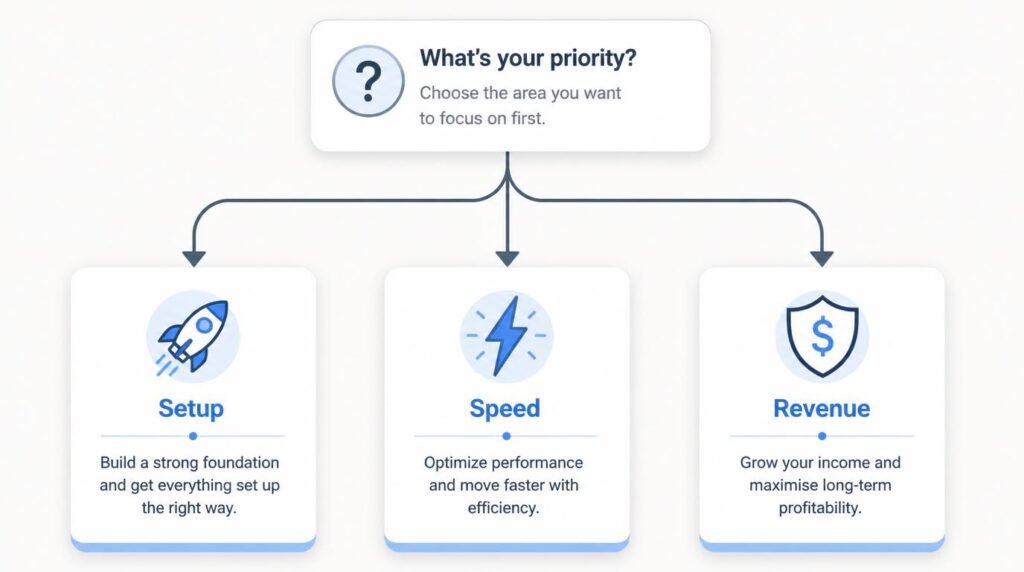
The 3-Question Decision Tree That Replaces 40 Reviews
Why do most “best hosting” lists leave you more confused than when you arrived? Because they rank hosts in the abstract, as if every blogger were the same person with the same wallet and the same traffic. You’re not. So instead of a leaderboard, answer three questions in order, and stop at the first one that fits.
Question 1: Are you publishing your very first post, or migrating an existing blog? If this is your first site and the words “DNS record” make your eyes glaze, your bottleneck isn’t speed, it’s setup friction. You want guided onboarding more than a benchmark trophy. That points you toward Bluehost, which WordPress.org has officially recommended since 2005 and which now walks beginners through site creation with an AI-assisted wizard. If you’re migrating, skip ahead, your needs are sharper.
Question 2: Is your blog under roughly 10,000 monthly visitors, and is every dollar tight? Then the smart play is maximum value per dollar, and that’s Hostinger’s whole game. Its entry plan runs about $2.69 to $2.99 per month, bundles a free domain and free SSL, and runs on LiteSpeed servers that, in 2026 testing, post sub-400ms load times. ngl, that combination of cheap-and-genuinely-fast used to feel like a contradiction. New bloggers should still read my start here guide for new bloggers before locking anything in, because the host is only step one.
Question 3: Does your blog already make money, or will downtime cost you real revenue? Once a site earns, reliability stops being a luxury and becomes an expense you budget for. That’s where SiteGround earns its premium: Google Cloud infrastructure, an in-house CDN, and a support team that WordPress developers actually trust. You’ll pay more, especially at renewal, but a revenue site can absorb it. If monetization is your goal but you’re not there yet, my walkthrough on how to start a blog that makes money maps the path.
The 10 Best Blog Hosts, Ranked and Reasoned
The decision tree handles 90% of readers. For the rest, here’s the full field, ranked with the reasoning attached, because a rank without a reason is just an opinion in a nice font.
- 1. Hostinger — best overall value. Fastest in 2026 benchmarks, lowest renewal rates, free domain on all plans. The Premium plan covers up to three sites with 20GB SSD storage. My default recommendation for cost-conscious bloggers who still refuse to be slow.
- 2. Bluehost — best for absolute beginners. WordPress.org-recommended, the most hand-held setup on this list, free first-year domain. Starts around $2.99–$4.99/month depending on term. Speed is merely adequate, but onboarding is unmatched.
- 3. SiteGround — best for revenue-generating blogs. Premium Google Cloud performance, elite support, AI anti-bot security. StartUp from $3.99/month, but it renews near $17.99, so plan for the long-term cost.
- 4. DreamHost — best for pricing transparency. The third WordPress.org-recommended host, NVMe storage, free domain privacy, and an industry-leading 97-day money-back guarantee. Shared Starter from roughly $2.59/month.
- 5. InMotion Hosting — best for US and EU small sites. 100GB NVMe storage on the Launch plan and a generous 90-day refund window. Data centers only span the US and Europe, so distant audiences need a CDN.
- 6. Hosting.com — best rock-bottom entry price. Plans from about $1.99/month and fast hardware for high-traffic sites, though it trims advanced features to hit that number.
- 7. HostGator — best for unmetered growth. Unmetered bandwidth and storage plus a 45-day guarantee, suited to bloggers juggling multiple growing sites.
- 8. WordPress.com — best maintenance-free option. Zero hosting complexity and a free tier to start writing today, but custom themes and monetization sit behind higher plans.
- 9. Kinsta — best premium managed WordPress. Google Cloud Platform performance for bloggers who’ve outgrown shared hosting and will pay for it.
- 10. GreenGeeks — best eco-friendly host. Solid performance with renewable-energy offsets, for bloggers who want their footprint to match their values.
Notice a pattern? The top three aren’t competing for the same blogger at all. They’re each the clear winner for a different person, which is exactly why the leaderboard format fails you and the decision tree doesn’t. If you want to go deeper on the fundamentals before choosing, my blogging basics resources cover the groundwork.
The Renewal-Price Trap Nobody Warns Beginners About
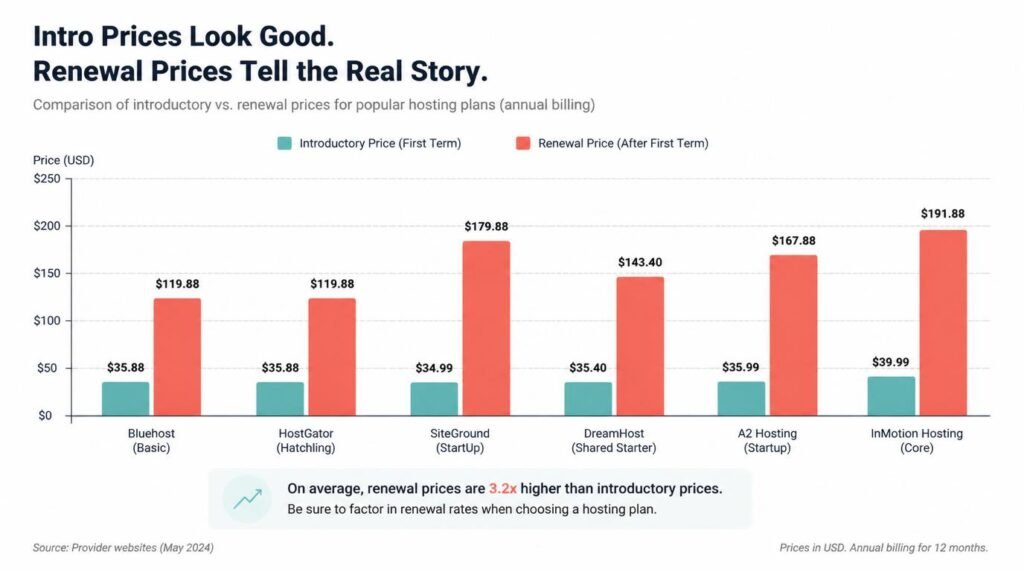
Here’s the myth I want to detonate: that the advertised monthly price is the price you’ll pay. It isn’t, and the gap is brutal. Hosting introductory rates are loss leaders, engineered to win your signup, and the renewal is where the math turns against you.
Consider the real 2026 numbers. SiteGround’s GrowBig plan reels you in at under $7 per month, then renews at a staggering $29.99. Bluehost’s Business plan renews at $13.99. Hostinger’s Business plan also renews at $13.99, but it started at $3.99 rather than Bluehost’s $6.99, so the lifetime cost diverges hard. The host that looks cheapest in month one is frequently the most expensive by month thirteen. TBH, the entire industry quietly depends on you not reading the renewal fine print.
So the insider move, the thing experienced bloggers do that beginners don’t, is to lock in the longest term you can comfortably afford on a host with a low renewal rate, not just a low intro rate. A 48-month term on Hostinger isn’t a commitment trap; it’s you front-running the price hike. The discipline of comparing renewal columns instead of headline columns will save you more money than any coupon code. For broader context on how Google itself frames a fast, reliable site, the Google Search Central documentation on Core Web Vitals is the authoritative source, and it makes clear why your host’s performance is a ranking input, not a vanity metric.
Advanced: Reading TTFB, Caching, and the Speed Numbers That Matter
Most hosting articles stop at “it’s fast!” Let’s go where they won’t. When you see a host quote a load time, the number that actually predicts your reader’s experience is TTFB, time to first byte: how long the server takes to start responding before a single pixel renders. Hostinger’s roughly 246ms TTFB on LiteSpeed isn’t marketing fluff; it’s the difference between a reader who waits and a reader who bounces.
But raw server speed is only half the story, and here’s the part that trips up even intermediate bloggers. Caching does the heavy lifting once traffic arrives. SiteGround layers its SuperCacher and an in-house CDN; Hostinger leans on LiteSpeed’s built-in caching. The practical implication: a “slower” host with aggressive caching can outperform a “faster” host with none under real-world load. So when you compare benchmarks, ask whether the test ran with caching on or off, because that single variable can flip the ranking entirely.
And what about the claim that you need a CDN no matter what? Partly true, partly oversold. If your audience clusters in one region near your data center, a CDN’s benefit shrinks. If your readers are global, it’s essential. The peer-reviewed and industry literature on web performance, well summarized by resources like the web.dev guidance on TTFB, consistently ties faster server response to lower bounce rates and better engagement, which is ultimately what your rankings reward.
Expert Commentary: This walkthrough is worth ten minutes because it runs side-by-side live speed tests on the same WordPress install across hosts, so you watch the TTFB and caching differences I described above play out in real time, instead of taking anyone’s word for the numbers.

Blogger Hosting Questions People Actually Ask
What is the best web hosting for a beginner blogger on a tight budget?
Hostinger is the strongest pick here. Its Premium shared plan starts around $2.69 to $2.99 per month, includes a free first-year domain, free SSL, and fast LiteSpeed servers. The deciding factor is the renewal rate, which stays low while competitors spike, so your cheap host stays cheap.
Is Bluehost or Hostinger better for bloggers in 2026?
They win different bloggers. Bluehost is WordPress.org-recommended and offers the most guided, beginner-friendly setup with a free domain, so it’s ideal if you want maximum hand-holding. Hostinger is faster and cheaper, especially at renewal, so it’s the better long-term value if you’re comfortable with a slightly less hand-held dashboard.
How much does blog hosting cost per month?
Entry-level shared blog hosting runs roughly $2 to $4 per month on an intro term in 2026. Budget hosts like Hostinger and DreamHost sit at the low end, while premium managed hosts like SiteGround start near $3.99 but renew at $17.99 or more. Always weigh the renewal price before you commit.
Do I need WordPress hosting to start a blog?
You don’t strictly need a WordPress-branded plan, but managed WordPress hosting makes blogging far easier by pre-installing WordPress and automating updates, backups, and caching. Most beginner-friendly hosts now bundle managed WordPress into their standard shared plans at no extra cost.
Which web host is fastest for bloggers?
In 2026 testing, Hostinger posts the fastest load times with sub-400ms averages on LiteSpeed servers, followed closely by SiteGround on Google Cloud. Because speed depends on audience location, a nearby data center or built-in CDN matters as much as the headline benchmark.
Can I switch web hosts later without losing my blog?
Yes. Most reputable hosts offer free migration, and your posts, images, and database move with you. The only real friction is a few hours of DNS propagation, so you’re never locked in, you can start cheap and upgrade as your traffic grows.
My Top Recommended Gear
- Logitech MX Master 3S Wireless Mouse — I recommend this because long editing and formatting sessions wreck your wrist, and its ergonomic shape plus quiet clicks made my multi-hour publishing days genuinely sustainable. Check it on Amazon
- Blue Yeti USB Microphone — If your blog grows toward video or podcasting (and most do), this is the cleanest entry-level audio I’ve tested, and it plugs in without an interface. Check it on Amazon
- Anker 7-in-1 USB-C Hub — I recommend this because a single-port laptop and a blogger’s reality (camera cards, external drives, monitor) don’t mix, and this hub quietly solved every connection headache I had. Check it on Amazon
Disclaimer: This post contains affiliate links. As an Amazon Associate, I may earn a commission from qualifying purchases at no additional cost to you. I only recommend products I’ve personally tested or rigorously researched.