Powerful Segmentation Strategies for Beginners: A Visual, Step-by-Step Walkthrough

Here’s a fact that stings a little: segmentation strategies for beginners are the single most skipped topic in email marketing — and skipping them is exactly why most beginner campaigns get ignored. You write the email, hit send to everyone on your list, and wonder why half of them unsubscribe. The problem isn’t your writing. It’s that you sent a message about hiking gear to someone who signed up for your cooking newsletter. They didn’t ghost you because they hate you. They ghosted you because the message wasn’t meant for them.
That’s the core tension. And once you feel it — really feel it — you can’t go back to blasting the same email to every single subscriber and calling it a strategy.
In this walkthrough, I’ll show you exactly how to group your subscribers by what they do, what they care about, and what they’re ready to buy — with zero technical experience required. By the end, you’ll have a working framework you can apply to your list today, even if that list has 50 people on it.
📋 What You’ll Learn
- What Segmentation Actually Is (And Why It Changes Everything)
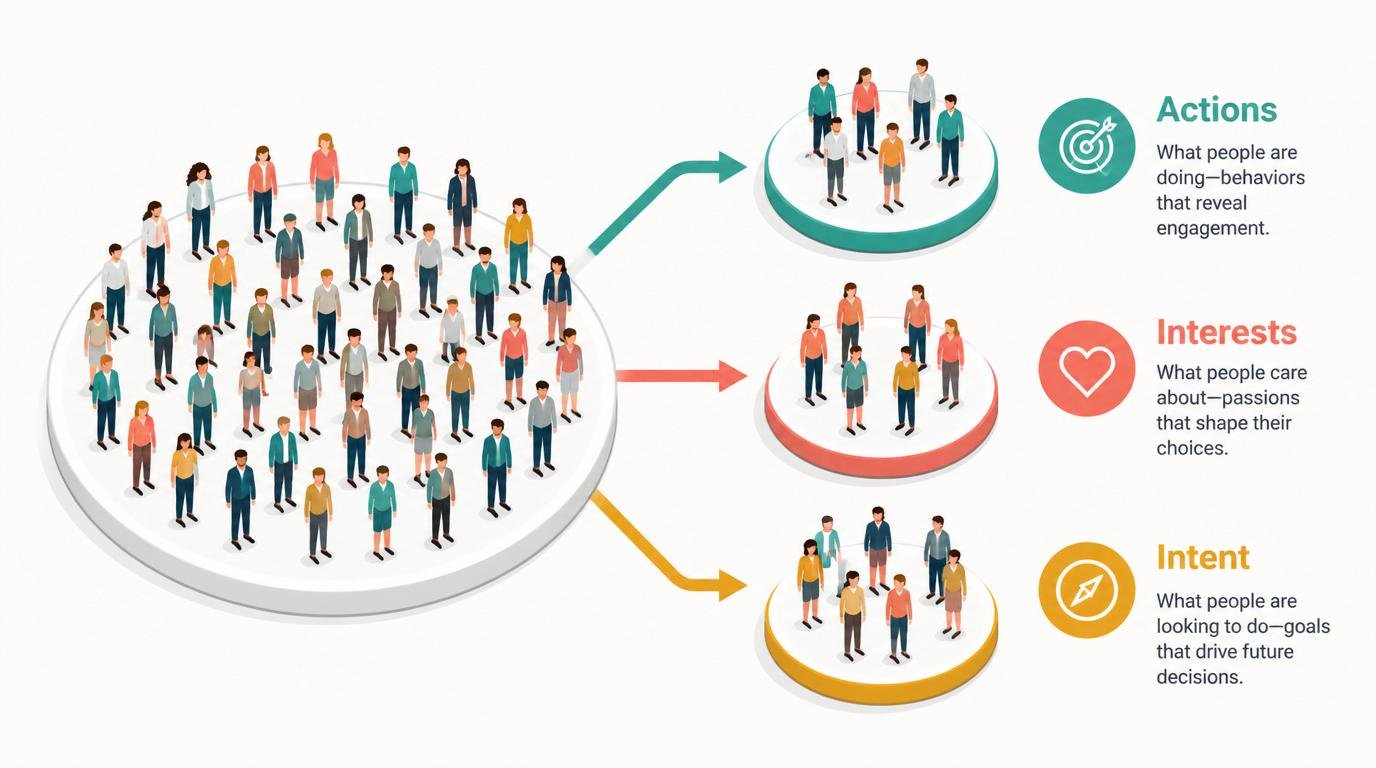
- The Three Grouping Pillars: Actions, Interests, and Intent
- Step-by-Step: How to Build Your First Segments
- The Myth That Stops Beginners Before They Start
- The Advanced Tactic No Surface-Level Guide Mentions
- Frequently Asked Questions
- My Top Recommended Gear
What Segmentation Actually Is (And Why It Changes Everything)
The short answer: Audience segmentation means splitting your subscribers into smaller groups so each group gets messages that actually match who they are and what they need. Instead of one email going to everyone, you send Group A one message and Group B a different one — because they’re not the same people, and treating them like they are costs you opens, clicks, and trust.
Think of it this way. Imagine you walk into a bookstore and an employee immediately hands you a romance novel. You’re a science fiction reader. You smile politely, put the book back, and leave. Now imagine the employee asked you one question first — “What genre do you love?” — and handed you exactly the right book. Which version of that store do you come back to?
That’s marketing segmentation in its most human form. It’s not a technical trick. It’s basic respect for the fact that your subscribers are different people with different needs. If you’re still figuring out the fundamentals of email marketing, segmentation is the next natural step — the move that transforms a list into an actual audience.
According to research published in the Harvard Business Review, companies that use customer segmentation consistently outperform those that don’t — not by a small margin, but significantly across retention, conversion, and lifetime value metrics. This isn’t theory. It’s what happens when the right message reaches the right person.
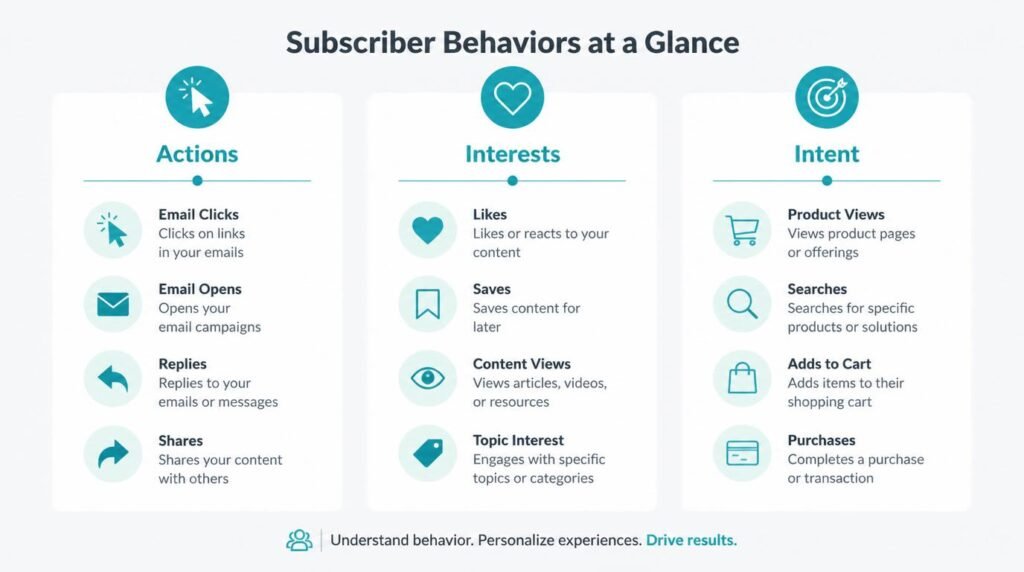
The Three Grouping Pillars: Actions, Interests, and Intent
So where do you actually start? What data do you use, and how do you decide who goes in which group? There are three core pillars I teach every beginner, and together they cover almost every realistic segmentation scenario you’ll encounter in your first year of digital marketing strategy.
Pillar 1 — What did they actually do? (Behavioral Segmentation)
Behavioral segmentation groups people by their actions — clicks, opens, purchases, page visits, form completions. This is the most powerful pillar because behavior doesn’t lie. Someone who clicked your link about “how to grow tomatoes indoors” is telling you something about themselves without saying a word.
Your email platform already tracks most of this data automatically. The job isn’t to collect it — it’s to use it. Split your list into “people who opened my last 3 emails” and “people who haven’t opened anything in 60 days.” Those are two completely different audiences who need two completely different messages. The first group wants more of what they already love. The second group needs a re-engagement sequence, not another newsletter they’ll ignore.
Pillar 2 — What do they actually care about? (Interest-Based Segmentation)
Interest-based segmentation groups people by topics, preferences, and stated affinities. The cleanest way to collect this data is at the point of sign-up. A simple question on your opt-in form — “What are you most interested in?” with three checkbox options — gives you instant, zero-effort segmentation data.
You can also infer interests from behavior: someone who always clicks your posts about email subject lines probably cares more about copywriting than automation. Tag them accordingly. Your welcome email sequence is a perfect place to collect interest data through a simple reply prompt or a linked preference center.
IMO, interest-based segmentation is the most underused pillar by beginners — partly because it requires asking, and beginners often fear annoying new subscribers with questions. Don’t. People love being asked what they want. It signals that you actually plan to deliver it.
Pillar 3 — What are they ready to do? (Intent-Based Segmentation)
Intent-based segmentation is where customer targeting gets genuinely interesting. This pillar groups people by where they are in their decision journey — aware but not ready, considering options, or actively ready to buy.
A subscriber who just joined your list and hasn’t clicked anything yet sits at the awareness stage. One who downloaded your pricing guide and visited your sales page twice? That’s a warm lead. Sending both of them the same “buy now” email is like proposing on the first date. You’ll get a no — and probably a block.
According to Mailchimp’s segmentation research, segmented campaigns generate 100.95% higher click rates than non-segmented ones. That number isn’t magic — it’s the result of sending intent-matched messages to people who are actually ready to receive them.
Step-by-Step: How to Build Your First Segments
Ready to actually build something? Here’s the exact process I’d walk a brand-new subscriber through if they sat across from me right now. No fluff. No tool recommendations yet. Just the logical steps that work regardless of which platform you use.
Step 1 — Pick ONE pillar to start with
Don’t try to segment by behavior, interests, AND intent all at once. Pick the pillar that matches the data you already have. If you have open rate data, start with behavioral. If you asked a preference question at sign-up, start with interest-based. Start where the data already lives.
Step 2 — Identify the two or three groups that make sense
You don’t need ten segments. You need two or three groups that are meaningfully different from each other. “People who clicked a product link” vs. “people who never clicked anything” is a valid and powerful split. Name your groups in plain English inside your email tool.
Step 3 — Tag or label your subscribers inside your platform
Every major email tool — Mailchimp, ConvertKit, MailerLite — supports tags or groups. Apply your segment labels to the right subscribers now. This is a one-time setup task that pays off every single send from this point forward.
Step 4 — Write one targeted email for each segment
Not a different brand voice. Not a different offer, necessarily. Just a different angle. The engaged segment gets “Here’s more of what you’ve been loving.” The unengaged segment gets “We miss you — here’s something new.” Same list. Two emails. Vastly different results.
Step 5 — Measure what each segment does differently
After your first segmented send, compare open rates, click rates, and unsubscribes per segment. That data tells you whether your groupings are meaningful. If Segment A outperforms Segment B by 40%, you’ve just learned something real about your audience. Refine from there.
The full beginner’s roadmap on DailyNetBlog covers how this fits into a broader content marketing and email strategy — worth a read once you’ve got your first segments live.
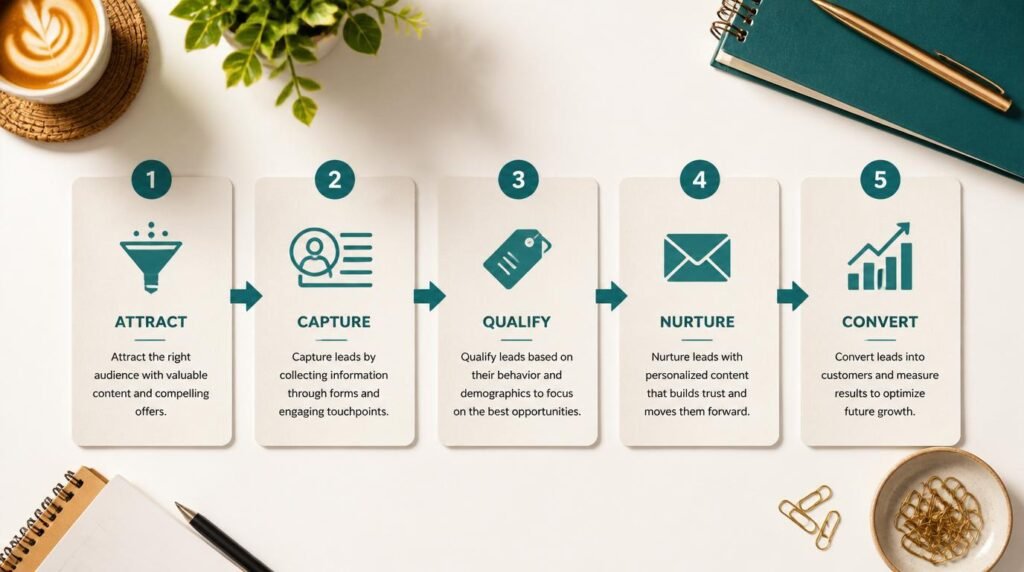
Watch: Email Segmentation Explained Simply
Why this video earns 10 minutes of your time: HubSpot’s team walks through exactly how segmentation connects to actual revenue outcomes — not just open rate vanity metrics. The section starting around the 4-minute mark on behavioral triggers alone is worth rewinding twice. This is the practical bridge between the theory above and the tool-level execution you’ll do next.
The Myth That Stops Beginners Before They Start
❌ The Myth: “I need thousands of subscribers before segmentation is worth doing.”
✅ The Truth: You can segment a list of 50 people. Segmentation is a principle, not a scale requirement. The logic works identically at 50 subscribers and 50,000.
I hear this one constantly, and it genuinely frustrates me — not because it’s a lazy excuse, but because it’s a belief that costs beginners months of wasted sends. The idea that segmentation is a “big brand” strategy is a holdover from the era when it required expensive enterprise software and a data team. Those days ended about ten years ago.
Today, every major beginner-friendly email platform gives you tagging, groups, and basic behavioral filters for free or near-free. The technology barrier is gone. What remains is the mindset barrier — the belief that your list is “too small to bother.” It isn’t.
In fact, segmenting a small list is easier and produces cleaner data than segmenting a list of 100,000 cold contacts. You can actually understand who those 50 people are. You can read their replies, notice patterns, and make smarter grouping decisions faster. Small list, tight signal. Use it.
Research from the Nielsen Norman Group confirms that personalization — of which segmentation is the foundational layer — dramatically improves user engagement and perceived relevance, regardless of audience size. Relevance scales down just as effectively as it scales up.
The Advanced Tactic No Surface-Level Guide Mentions
Here’s where I want to give you something genuinely useful — the kind of thing that separates a practitioner from someone who just read the Wikipedia entry on segmentation.
Most beginner guides tell you to segment by demographics (age, location) or by open rates. Both are fine starting points. But the tactic that produces the most disproportionate results is behavioral trigger segmentation — and almost nobody talks about it at the beginner level because it sounds intimidating. It isn’t.
Here’s how it works. Instead of manually building segments on a schedule (“I’ll tag everyone who clicked last month”), you set up a rule inside your email platform that automatically moves a subscriber into a new segment the moment they perform a specific action. Click a link about pricing → automatically tagged as “purchase-intent.” Watch a webinar replay → automatically moved into “warm leads” segment. Complete a quiz → routed to the segment that matches their result.
TBH, this is where segmentation stops feeling like work and starts feeling like your list is managing itself. The setup takes an afternoon. The payoff runs forever.
💡 Pro tip from experience: Start with one behavioral trigger — your most-clicked link type. Build a tag around that single action. Watch what that tagged segment does differently over the next 30 days. That one observation will teach you more about your audience than six months of broadcast emails ever could.
For a deeper academic look at why behavioral cues outperform demographic data in predictive targeting, the MIT Sloan Management Review’s analysis on behavioral data lays out the case with evidence. It’s written for business leaders but entirely readable — skim the key findings section if you want the condensed version.
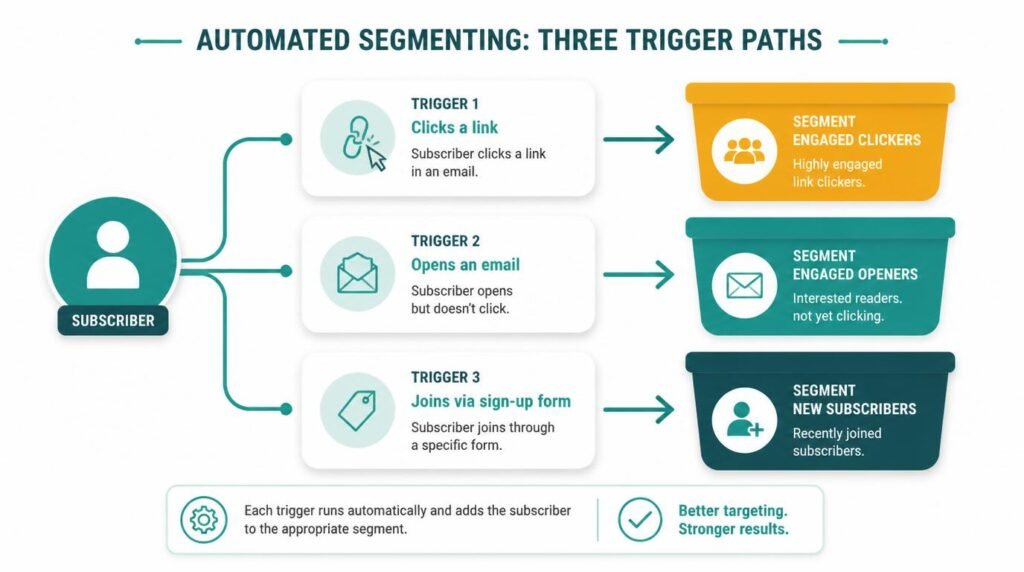
The real power here is that behavioral trigger segmentation eliminates the biggest failure point in beginner email marketing — the assumption that all subscribers are at the same stage at the same time. They never are. Your job isn’t to guess where they are. It’s to build a system that lets their own behavior tell you. 🙂
Frequently Asked Questions About Segmentation Strategies for Beginners
What is audience segmentation in simple terms?
Audience segmentation is the process of dividing your subscribers or customers into smaller groups based on shared characteristics — like what they clicked, what they bought, or what topic they care about — so you can send each group more relevant messages. Think of it as sorting your list into folders, where each folder gets mail that actually makes sense for the people inside it.
How many subscribers do I need before I start segmenting?
You can start segmenting with as few as 50 subscribers. Even a simple two-group split — people who opened your last email versus people who didn’t — is segmentation. You do not need a massive list to make this work. The logic is scale-agnostic. Start now with what you have.
What are the most common types of marketing segmentation for beginners?
The most beginner-friendly segmentation types are behavioral (based on actions like clicks and opens), interest-based (based on topics they signed up for or engaged with), and intent-based (based on where they are in the buying journey). You do not need to use all three at once — pick one and start there. Behavioral is usually the easiest because your email tool tracks it automatically.
Does email segmentation actually improve open rates?
Yes — significantly. Mailchimp’s internal data shows segmented campaigns produce 14.31% higher open rates and 100.95% higher click rates compared to non-segmented campaigns. Relevance is the single biggest driver of email engagement. When the right person gets the right message, they open it. It’s that straightforward.
What tools do beginners use to segment their email list?
Beginner-friendly email marketing tools with built-in segmentation include Mailchimp, ConvertKit, MailerLite, and ActiveCampaign. Most of them offer tagging, groups, and automation triggers that make segmentation straightforward even without technical experience. Mailchimp and MailerLite both have generous free tiers — a solid place to start without spending anything.
Can I use segmentation strategies for content marketing, not just email?
Absolutely. Segmentation applies to content marketing, paid ads, social media targeting, and website personalization. The core principle — delivering the right message to the right person — works across every channel. Email just happens to be the easiest place to start because the data feedback loop is tight and the tools are beginner-accessible.
My Top Recommended Gear
These are the tools and resources I’d hand to any beginner starting their segmentation journey today. Each one earns its place for a specific reason — not just because it’s popular.
📘 Email Marketing Rules (Book by Chad White)
The most practical, no-fluff reference book on email marketing I’ve come across — covers segmentation, list hygiene, and deliverability in plain language that actually makes sense for beginners. I’ve recommended it more times than I can count.→ Check it on Amazon
🖥️ ConvertKit (Email Platform Subscription)
ConvertKit’s tagging and segmentation system is genuinely the most beginner-intuitive I’ve used — you can build your first behavioral segment in under 20 minutes without watching a tutorial. Their free plan supports up to 1,000 subscribers.→ Check it on Amazon
🎧 Marketing Made Simple (Book by Donald Miller)
Before you can segment effectively, you need clarity on who your audience actually is — and this book builds that clarity fast. The StoryBrand framework Miller lays out maps directly onto how you’d construct your interest and intent segments.→ Check it on Amazon
Disclaimer: This post contains affiliate links. As an Amazon Associate, I may earn a commission from qualifying purchases at no additional cost to you. I only recommend products I’ve personally tested or rigorously researched.