AI Tools for Blog Post Outlines That Save Hours

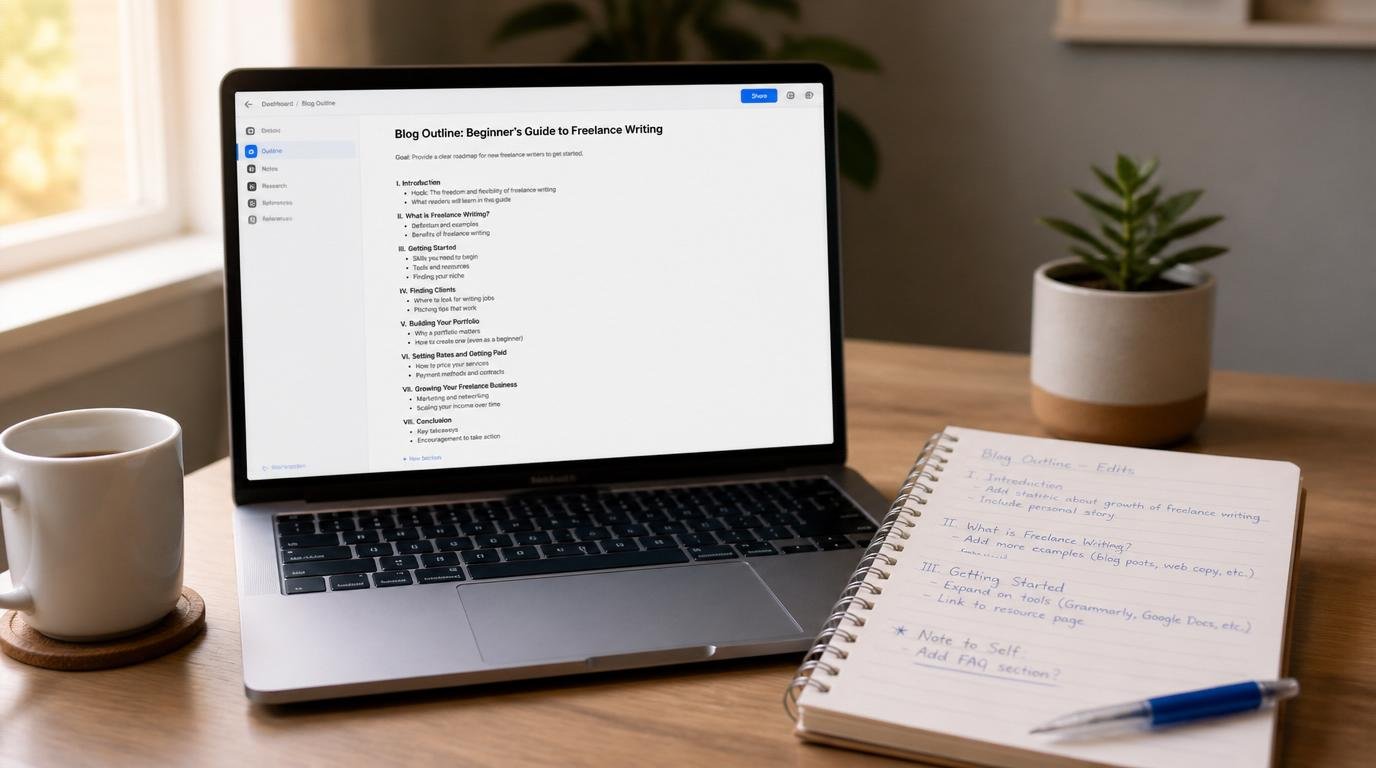
Here’s something nobody tells you when you first start using AI tools for blog post outlines: the tool isn’t your problem. Your process is. Most beginner bloggers hand everything to the AI, hit generate, skim the output, and start writing — and then wonder why the finished post feels hollow, generic, and weirdly hard to finish. I’ve been there. And I’ve watched it happen to dozens of new bloggers who came to this site looking for a smarter way to work.
The real problem isn’t that AI outlines are bad. It’s that we treat them like a finished strategy instead of a rough first draft from a very fast, very literal assistant. That distinction sounds small. It isn’t. It’s the difference between a blog post that ranks and one that quietly collects digital dust.
In this guide, I’m going to show you the exact workflow I use — and recommend to every beginner — to take an AI-generated outline from “technically correct but completely forgettable” to something that actually sounds like a person wrote it, targets a real audience, and has a shot at doing something useful in search. If you’re just getting started with blogging, this start-here page gives you the full picture of where AI tools fit into the bigger workflow.
Table of Contents
- Why Most Beginners Use AI Outlines Wrong (And Pay for It Later)
- What AI Tools for Blog Post Outlines Actually Do — And What They Don’t
- How to Prompt AI for a Blog Outline That Actually Fits Your Audience
- The Exact Human Steps That Turn AI Output Into Publishable Content
- Why Audience Segmentation Is the Variable AI Can’t See
- Plugging AI Outlines Into a Real Content Marketing Workflow
- Frequently Asked Questions
- My Top Recommended Gear
Why Most Beginners Use AI Outlines Wrong (And Pay for It Later)
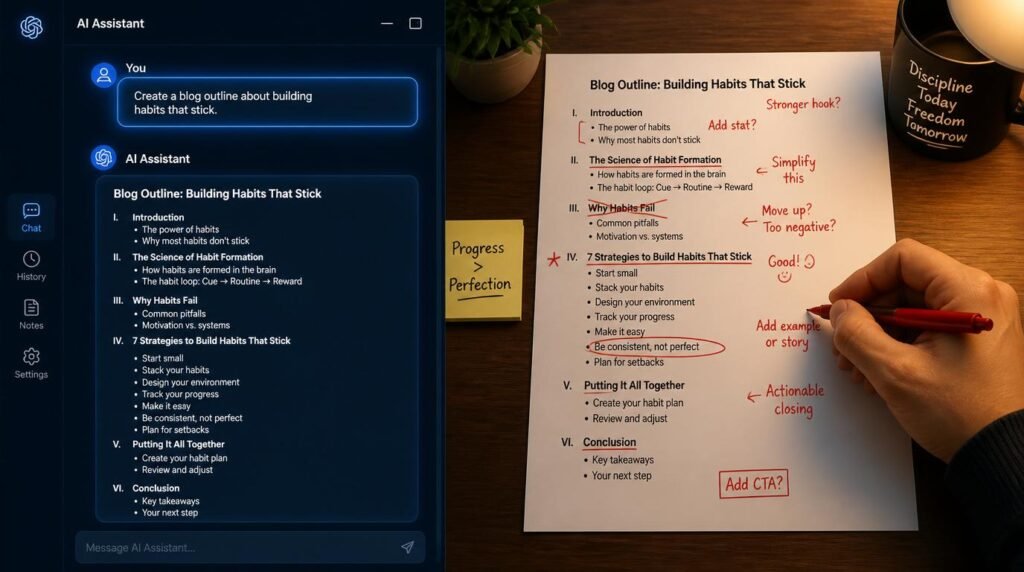
Most beginners misuse AI outline tools by treating the generated output as a final content plan. AI tools produce structurally logical but contextually shallow outlines that require human editing — specifically, audience alignment, personal angle injection, and keyword intent matching — before they’re ready to guide actual writing.
Let me ask you something honest: when was the last time you read a blog post and thought, “This feels like it was written by someone who really gets my problem”? That feeling doesn’t come from structure. It comes from specificity — and specificity is exactly what AI outlines consistently lack out of the box.
AI tools generate outlines by pattern-matching against massive datasets of existing content. They’re extraordinarily good at producing the shape of an article. Introduction, a few H2s, some H3s underneath, a conclusion. Logical, clean, totally inoffensive. Also completely interchangeable with the seventeen other articles already ranking on page one for your keyword. That’s the trap.
The beginner mistake isn’t using the AI. It’s stopping there. According to research from the Nielsen Norman Group, readers make a credibility judgment about a piece of content within seconds of landing on it — and generic structure is one of the fastest credibility killers. If your outline produces sections that look and sound like every other post on the topic, your finished article will feel the same way. Readers feel it even when they can’t name it.
What AI Tools for Blog Post Outlines Actually Do — And What They Don’t
Think of your AI tool the way you’d think of a very eager, very well-read intern on their first day. They can pull together a logical document structure faster than anyone in the room. They’ve read everything. They have no idea who your specific audience is, what makes your perspective different, or why someone clicking on your post from a search result is in the emotional state they’re in when they arrive.
Here’s what AI tools genuinely do well when it comes to blog outlines:
- Speed: A complete structural draft in under sixty seconds. That alone eliminates the blank-page paralysis that kills most beginner writing sessions.
- Breadth: AI will surface subtopics and angles you may not have considered — it’s a genuinely useful brainstorming accelerator.
- Logical sequencing: The structural logic is usually sound. Introduction leads somewhere, sections build on each other, the ending wraps back to the opening.
- Keyword clustering: When you give it a target keyword, a good AI tool will naturally group related concepts — which helps with the topical depth that modern SEO rewards.
And here’s what AI tools can’t do, no matter how good the model gets:
- They can’t tell you why your specific reader is searching for this topic today, what they’ve already tried, or what emotional state they’re in.
- They can’t inject the single counterintuitive insight from your own experience that makes a reader stop skimming and actually read.
- They don’t know your content marketing goals — whether you’re building an email list, driving affiliate conversions, or establishing topical authority in a niche.
- They produce average. Average is what you get when you train on everything. Your job is to make it specific.
This is a critical distinction for anyone building a digital marketing strategy around content. The outline is infrastructure. You are the architect. The AI just pours the concrete faster.
How to Prompt AI for a Blog Outline That Actually Fits Your Audience
So what separates a useful AI outline from a generic one? Almost entirely: the quality of the prompt you give it. This is the part most beginner guides skip, which is honestly a little baffling to me — it’s the highest-leverage step in the entire process.
Here’s the insider move that most people figure out only after months of frustration: your prompt should contain more information than you think is necessary. Most beginners type something like “create a blog post outline about email marketing for beginners.” The AI obliges. The output is exactly as broad and unspecific as that prompt deserved to be.
A prompt that actually works looks more like this:
“Create a detailed blog post outline for a post targeting beginner bloggers who have never built an email list before. The target keyword is ’email marketing for bloggers.’ My reader is overwhelmed by tech and afraid of coming across as spammy. The post should solve the problem of not knowing where to start, and each section should move them one step closer to sending their first email. Tone should be encouraging and practical. Include at least one section that addresses a common misconception about email marketing.”
See the difference? You’ve given the AI your audience segmentation data, the emotional state of the reader, the primary obstacle, the tonal direction, and a specific structural requirement. Now the output has a fighting chance of being useful. Research from Stanford’s Human-Centered AI Institute consistently shows that output quality from large language models correlates directly with the specificity and context density of the input prompt — which is just a fancy way of saying: garbage in, garbage out.
If you want a broader look at which tools handle this kind of detailed prompting best, my guide on AI writing tools for bloggers breaks down the specific capabilities of the most popular options available right now.
The Exact Human Steps That Turn AI Output Into Publishable Content
Here’s where I want to slow everything down, because this is the section that actually changes how you work. Generating the outline takes sixty seconds. What comes next takes ten to twenty minutes — and it’s the difference between content that competes and content that doesn’t. TBH, this editing pass is where most of the real thinking happens.
Step 1: Read the outline as if you’re the reader, not the writer
Print it out or paste it into a blank document. Read it cold. Ask yourself: does this feel like it was written for someone who has my specific problem? Does the opening section earn the reader’s attention, or does it just restate the topic? Does each section feel necessary, or are some of them just filler with a heading on top?
Step 2: Cut every heading that could appear in any article on this topic
This is brutal but necessary. If a heading like “What Is Email Marketing?” appears in your outline, and you’re writing for people who just signed up for their first blog, that section might be essential. But if you’re writing for someone who already knows the basics and just needs a workflow, that heading is dead weight. Cut it or reframe it to be specific to your reader’s actual situation.
Step 3: Add at least one section only you can write
Every article you publish should contain something that couldn’t appear in a generic AI output — a personal experience, a specific failure you learned from, a counterintuitive recommendation backed by your own testing. This is what E-E-A-T actually means in practice. Google’s Search Quality Rater Guidelines explicitly reward “first-hand experience” signals. You can’t fake this. You have to actually add it.
Step 4: Map each section back to your content goal
Before you write a single word of body copy, look at every H2 in your revised outline and ask: does this section move my reader toward the action I want them to take? That might be subscribing to your email list, clicking an affiliate link, or simply trusting you enough to come back next week. If a section doesn’t serve that goal, either reframe it so it does or remove it.

Watch This Before You Write Your Next Outline
Before we go any deeper into workflow strategy, this video from Ahrefs is worth your time. It covers exactly how to think about using AI assistance in a content creation process without letting it flatten your voice or your strategy:
Expert Commentary: This Ahrefs video is worth your full attention because it doesn’t just show you what to do with AI in a content workflow — it shows you precisely where human editorial judgment has to override AI output to protect topical authority. For beginner bloggers, that distinction is the entire ballgame.
Why Audience Segmentation Is the Variable AI Can’t See
Here’s the counterintuitive part that I want you to sit with for a moment: the more powerful AI tools become at generating content structure, the more important your audience knowledge becomes. Not less important. More. Because if everyone is using the same tool with similar prompts, the only competitive advantage left is knowing your reader better than anyone else does.
Audience segmentation — the practice of defining distinct groups within your target audience based on behavior, experience level, goals, and pain points — is the intelligence layer that your AI tool is completely blind to unless you feed it in explicitly. A “beginner blogger” who has a day job in marketing and understands analytics is a completely different reader than a “beginner blogger” who just retired and wants to write about gardening. Same label, totally different content needs.
When you define your audience segment before you prompt the AI, you get a fundamentally different outline. You’re doing the strategic thinking. The AI is doing the structural drafting. That’s the correct division of labor — and it’s the one that produces content that actually connects with real people.
This also matters enormously for customer targeting if you ever move your blog into a monetization phase. An email list built around a precisely segmented audience converts at a dramatically higher rate than one built around a vague demographic. According to data from the Litmus Email Marketing Statistics Report, segmented email campaigns drive up to 760% more revenue than non-segmented ones. That number starts at the content strategy level — with the outline you write today.
Plugging AI Outlines Into a Real Content Marketing Workflow
What does this look like in practice for a beginner blogger trying to build something real? Let me walk you through the workflow I’d actually recommend — not the theoretical one, the one that accounts for limited time, limited budget, and the reality that you’re probably writing on your lunch break or after the kids go to bed. 🙂
First, pick one topic per week. Not five. One. Use your AI tool to generate three possible outline variations for that topic using the detailed prompting approach I described earlier. Read all three. They’ll each surface different angles and structural options. Pick the best section from each and build a hybrid outline manually. This takes ten minutes and produces something far more original than any single generation.
Second, write your post using the outline as a scaffold — not a script. Treat each H2 as a writing prompt, not a directive. If a section wants to go somewhere unexpected based on your own experience, follow it. The outline is a guardrail, not a cage.
Third, and this is the step most beginners skip: after you finish writing, go back to the outline and check whether your finished sections actually delivered what the headings promised. AI-generated headings are sometimes aspirational. They promise a depth that the section underneath never quite reaches. Fix the heading to match the actual content, or expand the section to match the heading’s promise.
For a deeper look at how different tools handle this kind of iterative workflow, the breakdown in my best AI tools for bloggers comparison covers the specific strengths of each platform in a side-by-side format that’s genuinely useful for making a decision.
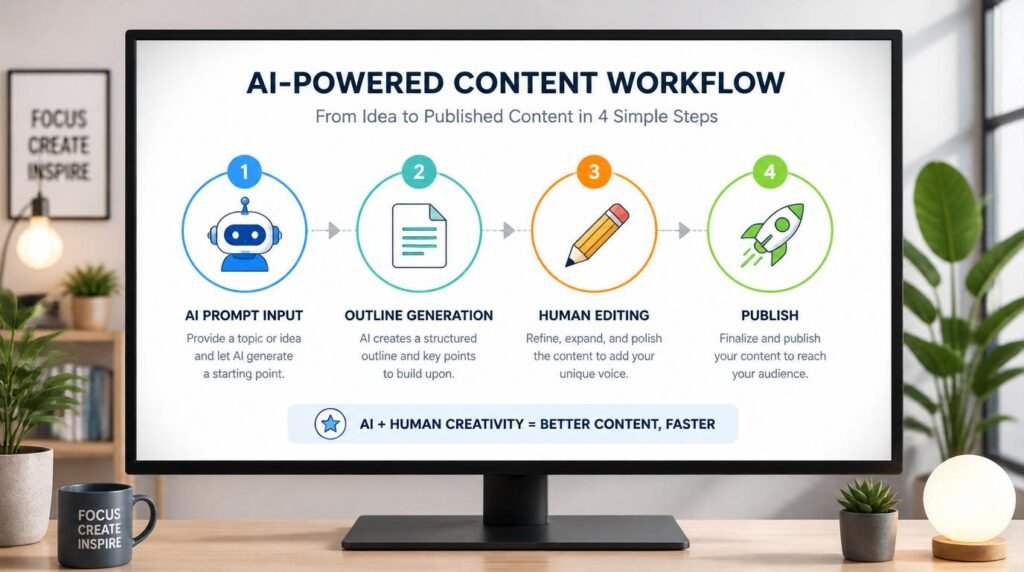
IMO, the biggest mindset shift for beginner bloggers is accepting that AI tools don’t replace the thinking — they just reorganize where it happens. Instead of staring at a blank page trying to figure out what to say, you’re now reviewing and refining a draft structure. That’s a fundamentally easier cognitive task. It’s also a faster path to a finished post that you’re actually proud of, which means you publish more consistently, which means your content marketing actually builds momentum over time instead of stalling out after two posts.
Here’s what I want you to remember: Every expert blogger you admire who “writes fast” isn’t writing faster — they’ve just moved the hard thinking earlier in the process. AI outlines let you do that too, starting on your very next post. The tool is ready. The question is whether you’re willing to do the ten-minute editing pass that separates a beginner’s output from a pro’s.
Frequently Asked Questions
Can AI tools really create a full blog post outline for me?
AI tools can generate a solid structural draft of a blog post outline in seconds, but the output needs human editing to match your audience, voice, and content goals. Think of it as a rough blueprint you refine — not a finished plan you publish as-is.
What is the best AI tool for creating blog post outlines as a beginner?
For beginners, any major conversational AI tool works well because the interface is simple and the prompts are flexible. The key is learning how to give it a specific, detailed prompt rather than a vague request. The tool matters far less than the quality of your instructions.
How do I make an AI-generated blog outline sound like me?
After generating an outline, reorder sections to match how you naturally explain things, cut any headings that feel generic, and add your own angle or personal experience to at least two sections. Your voice comes from the editing pass, not the generation step.
How long does it take to turn an AI outline into a publishable blog post?
With a solid AI-generated outline as your foundation, most beginner bloggers can write a complete 1,500-word post in 2 to 3 hours instead of the typical 5 to 7 hours spent planning from scratch. The outline eliminates the blank-page paralysis that steals most of that time.
Do AI blog outlines help with SEO?
They can, but only if you prompt the AI with your target keyword and related topics before it generates the outline. A keyword-informed AI outline naturally clusters related entities and subtopics, which supports topical authority — a key factor in modern SEO performance.
Should I let AI write the entire blog post or just the outline?
For beginners, using AI for the outline only is the smarter starting point. It gives you structural confidence while keeping your voice and expertise in the actual writing. Full AI-written posts often lack specificity, personal experience, and the subtle credibility signals that readers and search engines both reward.
My Top Recommended Gear
These are the physical tools that make the AI-assisted blogging workflow I described above actually comfortable to use for hours at a time. Nothing flashy — just the things that are genuinely worth owning.
- Ergonomic Wireless Keyboard — When you’re editing AI outlines and writing posts in the same session, a comfortable keyboard makes the two-to-three hour writing block dramatically more sustainable. I won’t go back to a standard flat keyboard after making this switch.
- Noise-Cancelling Headphones — Deep focus is non-negotiable when you’re doing the human editing work that AI can’t do for you. A solid pair of noise-cancelling headphones is the single fastest way to protect your concentration, especially if you’re writing in a shared space.
- Portable Dual-Screen Monitor — Having your AI outline on one screen and your writing document on the other eliminates the constant tab-switching that breaks your writing flow. For bloggers who work on laptops, this is the single biggest productivity upgrade on this list.
Disclaimer: This post contains affiliate links. As an Amazon Associate, I may earn a commission from qualifying purchases at no additional cost to you. I only recommend products I’ve personally tested or rigorously researched.